
Salesforce integration means connecting Salesforce to your other systems, such as your ERP, website, marketing tools or data warehouse, so data moves between them automatically. To do it well, decide which system owns each piece of data, pick the right pattern (real-time or batch), choose a tool that fits the number of systems you connect, and plan for API limits, security and errors before anyone writes code.
That’s the short answer. Below, we walk through each of those decisions the way we’d talk them through with a client on a first call, wherever your team is based.
- 95%of IT leaders say integration gets in the way of using AI well (MuleSoft)
- 6official integration patterns from Salesforce Architects
- 100,000+daily API calls for an Enterprise Edition org, before per-user additions (Salesforce)
What Is Salesforce Integration?
Salesforce integration is the process of connecting Salesforce with other applications so they share data and trigger actions without anyone copying information by hand.
Here’s what that looks like day to day:
- A deal is won in Salesforce, and a sales order appears in your ERP.
- The ERP sends the invoice number and payment status back to the account in Salesforce.
- A form on your website creates a lead in Salesforce and assigns it to the right rep.
- Support tickets, product usage or billing data show up on the customer record, so your team sees the full picture.
Without integration, people fill the gaps with exports, spreadsheets and double entry. That’s where errors start, and where reports stop matching.
Why Does Salesforce Integration Matter More in 2026?
Because AI can only use the data it can reach. If a customer asks an AI agent “where’s my order?” and the order sits in NetSuite or SAP, the agent can’t answer unless Salesforce can see that system.
MuleSoft’s research with more than 11,000 IT leaders found that 95% report integration as a hurdle to implementing AI effectively, and 66% still don’t provide an integrated experience across channels.
We see the same thing on projects. Teams that get real use out of Agentforce or Data 360 almost always connected their systems first. Teams that skipped that step end up with an AI agent that gives half answers.
What Are the Main Types of Salesforce Integration?
There are three main types: data integration, process integration and virtual integration. Salesforce Architects groups its official patterns the same way.
| Type | What it does | Typical example |
|---|---|---|
| Data integration | Keeps records in sync between Salesforce and another system | Accounts and products synced with the ERP every night |
| Process integration | Lets one system trigger a step in another system’s process | A won opportunity creates an order and starts fulfillment |
| Virtual integration | Shows external data inside Salesforce without copying it | Live stock levels or invoice history displayed on the account page |
Most projects use all three. Pick the type for each piece of data, not one approach for everything.
Which Salesforce Integration Tool Should You Use?
Use native APIs or a ready-made connector for one or two simple connections, an integration platform such as MuleSoft when you’re connecting many systems, and no-code tools only for light, low-risk automations.
| Option | Best for | Watch out for |
|---|---|---|
| Ready-made connector (AppExchange or vendor) | Standard processes with popular apps | Gets harder when you need custom fields or rules |
| Salesforce APIs and Apex | One or two focused connections with specific logic | You own the code and its upkeep |
| MuleSoft | Many systems, reusable APIs, enterprise governance | License cost and the skills to run it |
| Other integration platforms (Boomi, Jitterbit, Workato) | Teams already using that platform | Check connector quality for your ERP |
| No-code tools (Zapier, Make) | Simple, low-volume automations | Limited error handling, not for financial data |
Here’s a simple rule we use: count the systems. If Salesforce only needs to talk to one other system, start with a connector or the API. Once you’re at three or more, a platform usually pays for itself, because each new connection reuses work you’ve already done. Our MuleSoft development team helps companies make that call.
You’ll often see Copado or Gearset on “integration tool” lists. They’re good tools, but they move changes between Salesforce environments. They don’t connect Salesforce to your ERP.
What Are the 6 Salesforce Integration Patterns?
Salesforce Architects publishes six standard patterns for connecting Salesforce to other systems. Choose the right one early and you avoid most speed and reliability problems later.
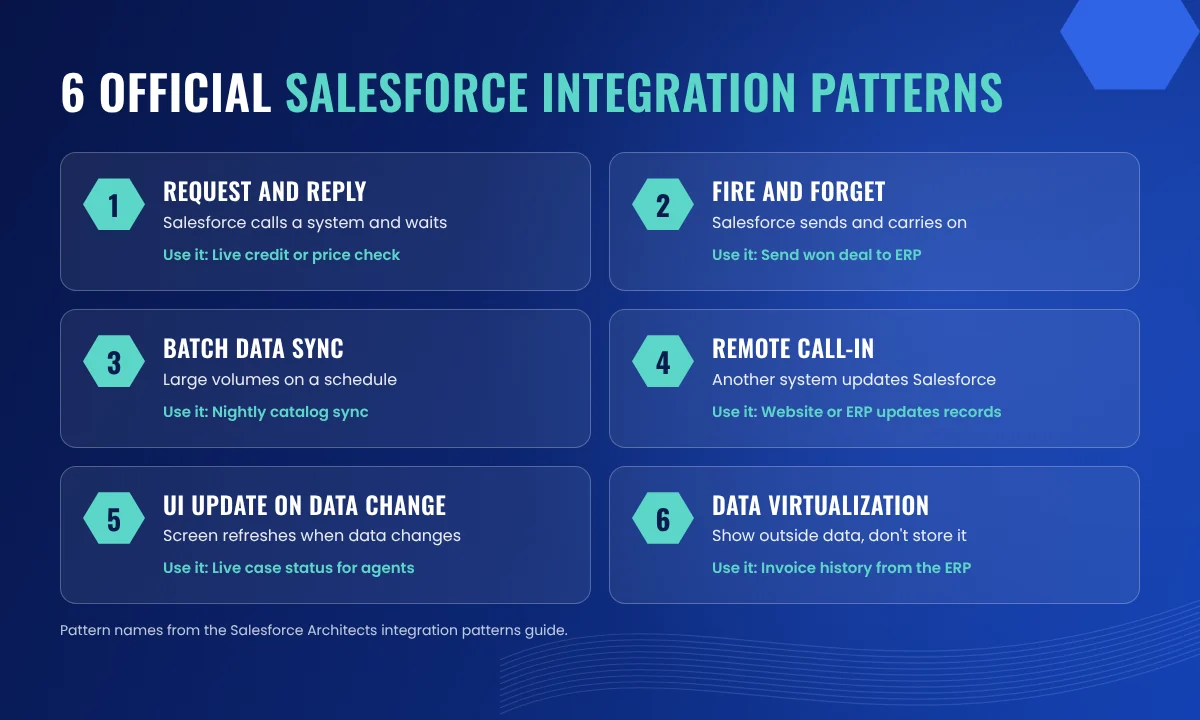
| Pattern | What happens | Use it when |
|---|---|---|
| Remote Process Invocation (Request and Reply) | Salesforce calls another system and waits for the answer | A rep needs a live credit check or price before moving on |
| Remote Process Invocation (Fire and Forget) | Salesforce sends a message and carries on without waiting | Sending a won deal to the ERP to create an order |
| Batch Data Synchronization | Large sets of records move on a schedule | Nightly sync of product catalogs or order history |
| Remote Call-In | Another system creates, reads or updates Salesforce data | Your website or ERP updates records in Salesforce |
| UI Update Based on Data Changes | The Salesforce screen refreshes when data changes | An agent sees a case status change without reloading |
| Data Virtualization | External data is shown in Salesforce but not stored there | Viewing invoice history held in the ERP |
You can read each pattern in detail in the official Salesforce Architects integration patterns guide.
Data migration often gets listed as a seventh pattern. It isn’t one. Migration is a one-time move of data into Salesforce. Integration is the ongoing connection after go-live. Plan them as separate pieces of work.
Should Your Salesforce Integration Be Real-Time or Batch?
Use real-time for data someone acts on straight away, and batch for large volumes that change slowly. Most good integrations use both, decided field by field.
Choose real-time when:
- A rep or agent needs the answer during a conversation, such as stock, credit or order status.
- A delay would cause a mistake, such as selling something that’s out of stock.
- Volumes are modest, a few records at a time.
Choose batch when:
- You’re moving thousands of records, such as price books or historical orders.
- Nobody needs the data within minutes.
- You want to protect API limits and system performance.
Making everything real-time sounds good on paper. In practice it costs more, loads both systems harder and breaks in front of users. Save it for the data that needs it.
How Do You Plan a Salesforce ERP Integration?
Start by deciding which system owns each piece of data. Then choose the sync timing, the tool, how failures are handled and who looks after the integration after go-live.
For most companies, the ERP is the connection that matters most, because it links what sales sells to what finance bills. A one-page ownership table settles most arguments before they start:
| Data | Owner | Direction |
|---|---|---|
| Leads, opportunities, quotes | Salesforce | Salesforce to ERP |
| Customer billing details | ERP | ERP to Salesforce |
| Product catalog and prices | ERP | ERP to Salesforce |
| Order, invoice and payment status | ERP | ERP to Salesforce |
| Account owner (sales rep) | Salesforce | Salesforce to ERP |
When both systems can edit the same field, you end up with two versions of the truth. Pick one owner per field and make the other system read-only for it.
The same rule holds whether you run NetSuite, SAP, Microsoft Dynamics 365, Sage Intacct, QuickBooks or an older on-premise system. Older systems may need middleware in between, but if they have an API, a readable database or even a scheduled file export, there’s usually a way to connect them.
If the integration is part of a bigger rollout, our guide to Salesforce implementation steps shows where it fits in the plan.
What Are Salesforce API Limits and Why Do They Matter?
Every Salesforce org has a daily allowance of API calls. If your integrations use it up, they stop working until the 24-hour window resets.
According to Salesforce’s API limits reference, an Enterprise Edition org gets 100,000 calls per 24 hours plus an amount per user license. For example, an org with 15 Salesforce licenses gets 115,000 calls a day. The limit is shared by every integration in the org, not per user.
That sounds like plenty until your website, ERP sync and marketing tool all check Salesforce every minute. A few habits keep you safe:
- Send changes, not everything.Sync only records that changed since the last run.
- Use bulk options for large volumesinstead of one call per record.
- Combine requestswhere the API allows several operations in one call.
- Stop polling.Let Salesforce push changes out instead of asking “anything new?” every minute.
- Watch usage.Set an alert before you reach the limit, not after.
How Do You Keep a Salesforce Integration Secure?
Give each integration its own user with only the permissions it needs, use secure authentication such as OAuth, and log every change to integration settings.
An integration moves customer, pricing and often financial data, so security belongs in the design:
- One integration user per connection,so you can see and switch off each one separately.
- Least privilege.The ERP integration doesn’t need access to support cases.
- OAuth and stored credentials,not shared usernames and passwords in code.
- Copy only what’s needed.Don’t move sensitive fields into systems that don’t use them.
- Check against the rules you work under,such as SOC 2, HIPAA for healthcare data or ISO 27001, before you build.
What Drives the Cost of a Salesforce Integration?
Five factors decide most of the cost: the number of systems, the number of objects and fields, one-way or two-way sync, real-time or batch, and the tool you choose.
- Number of systems.Each new system adds mapping, testing and upkeep.
- Objects and fields.Syncing orders only is far smaller than accounts, products, orders, invoices and payments.
- Direction.Two-way sync needs conflict rules, so it costs more than one-way.
- Timing.Real-time connections cost more to build and monitor than scheduled ones.
- Tool and licenses.A platform like MuleSoft adds license cost but cuts the cost of every later connection.
Budget for the running costs too. Someone has to watch for errors, test after each of Salesforce’s three yearly releases and update the mapping when you add fields. If you need extra hands for the build, here’s how to hire a Salesforce consultant without overpaying.
What Are the Most Common Salesforce Integration Mistakes?
The biggest mistakes are skipping data ownership, testing with clean sample data, and having nobody responsible after go-live.
- No data owner.Two systems edit the same field and nobody knows which value is right.
- Silent failures.Errors go into a log nobody reads, and you find out when a customer complains.
- Testing with three perfect records.Real data has blanks, duplicates and odd characters. Test with real volumes in a sandbox.
- Polling every minute.It burns API limits and slows both systems.
- No owner after go-live.Salesforce releases and ERP upgrades break integrations that nobody is watching.
Why Choose Saasverse for Salesforce Integration?
Saasverse is a Salesforce Partner with Navigator Expert status and 50+ certified Salesforce experts based in Jaipur, India.
- 120+ projects for 40+ clients in 19+ countries.
- US time-zone overlap, so your consultant joins your stand-ups.
- One team for design, build and support, so the people who build your integration also help run it.
- Integration options matched to your setup: APIs, MuleSoft or ready-made connectors.
- ISO 27001 and Cyber Essentials Plus certified. We sign an NDA before we see your org.
- Rated 5.0 on Clutch.
Conclusion: Plan the Decisions Before You Build
A good Salesforce integration starts with decisions, not code. Agree who owns each piece of data. Pick a pattern for each flow. Choose a tool that fits how many systems you’re connecting. Then plan for API limits, security and failures before the first line of code. Do that, and the double entry stops.
Planning a Salesforce integration? Tell us which systems you want to connect and we’ll reply within 24 hours.
Book a free Salesforce integration consultationFrequently Asked Questions
What are the main types of Salesforce integration?
There are three main types. Data integration keeps records in sync, process integration lets one system trigger steps in another, and virtual integration shows external data in Salesforce without copying it. Most projects use a mix of all three.
What are Salesforce integration patterns?
They’re standard designs published by Salesforce Architects for common integration needs. The six patterns are Request and Reply, Fire and Forget, Batch Data Synchronization, Remote Call-In, UI Update Based on Data Changes and Data Virtualization.
How many API calls does Salesforce allow per day?
An Enterprise Edition org gets 100,000 calls per 24 hours plus an amount per user license, for example 1,000 per full Salesforce license. An org with 15 Salesforce licenses gets 115,000 calls a day, shared by all integrations.
Do I need MuleSoft to integrate Salesforce?
No. For one or two connections, Salesforce APIs or a ready-made connector are often enough. MuleSoft makes more sense when you connect many systems and want reusable APIs and central monitoring.
Can Salesforce integrate with an older or on-premise ERP?
Usually, yes. If the ERP has an API, a readable database or a scheduled file export, it can normally be connected. Older systems often need middleware between them and Salesforce.
What is the difference between Salesforce integration and data migration?
Data migration is a one-time move of existing data into Salesforce, usually before go-live. Integration is the ongoing connection that keeps Salesforce and other systems in sync after go-live.
Can Salesforce integrate with QuickBooks or NetSuite?
Yes. Both have connectors on AppExchange and well-documented APIs, so they can be linked through a connector, an integration platform or custom code. Which route fits depends on your volumes, custom fields and whether you need two-way sync.
Is Zapier good enough for Salesforce integration?
For simple, low-volume tasks such as sending form leads to Salesforce, it can work. For financial data, high volumes or two-way sync, use APIs or an integration platform with proper error handling.
How do I know if my current Salesforce integration is failing?
Look for duplicate or missing records, reports that don’t match between systems, and staff exporting data to spreadsheets. Check the integration’s error log and your API usage in Salesforce Setup.
Poorvi Tailang
Poorvi Tailang is a Salesforce Developer at Saasverse, specializing in scalable CRM solutions, enterprise integrations, and custom applications. She focuses on emerging technologies such as Agentforce and Einstein AI, while sharing insights on Salesforce platform advancements, development best practices, and innovative CRM solutions.